[1] SoloStaff Bookkeeper processes receipts locally using whichever LLM provider you configure: Anthropic, OpenAI, xAI, or Google. No proprietary cloud pipeline, no per-document subscription. The LLM provider interface is an abstract base class with four concrete implementations, and the choice of provider is yours.
[2] The trade-off is visible: extraction accuracy depends on the vision quality of the model you pick. This post examines the three engineering layers behind that trade-off — the document preprocessing pipeline, the SQLite schema design, and the AI categorization logic that maps extracted text to CRA and IRS tax line numbers.
The Receipt Parsing Pipeline

core/document_processor.py.[3]
The entry point is DocumentProcessor.process_document(). It coordinates four steps: format validation, preprocessing, LLM extraction, and transaction assembly. Supported formats are .pdf, .png, .jpg, and .jpeg.
Preprocessing: from file to model-ready image
[4]
The preprocessing step normalizes every document to an image before sending it to the LLM. PDF documents are converted via PyMuPDF (fitz) at 200 DPI using a zoom matrix of fitz.Matrix(2.78, 2.78). The conversion renders the first page only and writes a temporary PNG to disk.
[5] The 200 DPI choice is deliberate: it produces enough resolution for the model to read small-print text without generating images large enough to strain API payload limits. For images that arrive directly, the processor caps both dimensions at 2048 px. If either exceeds that limit, the image is rescaled with Lanczos resampling and re-encoded as JPEG at quality 85. Quality 85 cuts file size by roughly half compared to lossless PNG for photographic content while preserving enough detail for character recognition.
Extraction: what the model is actually asked to do
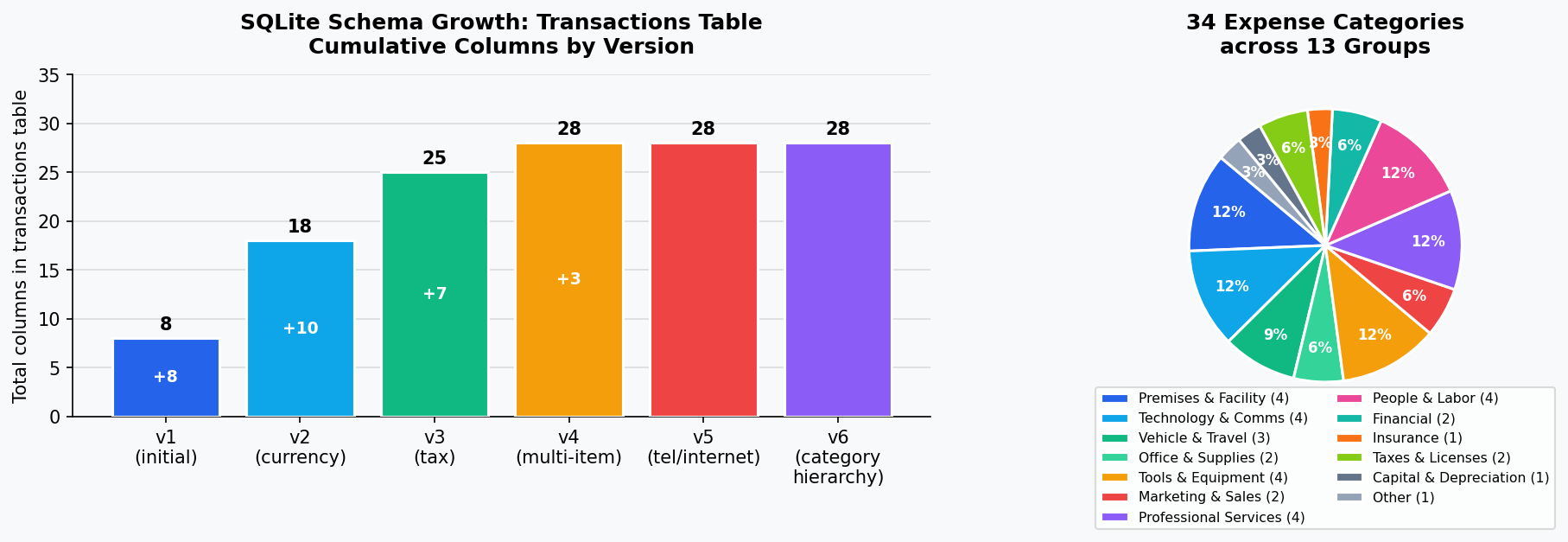
[6]
The extraction prompt sent to the LLM covers five stages: document type identification, field extraction, category selection, tax classification, and multi-item detection. The model is constrained to return a single JSON object and nothing else — enforced by a CRITICAL OUTPUT REQUIREMENT block in the prompt header.
[7] One of the harder problems is income vs. expense classification for invoices. An invoice you issued to a client is income; an invoice a vendor sent you is expense. The document layout is identical. The prompt resolves this with an explicit decision tree: check the header and letterhead first, then the "Bill To:" section. If the header matches the configured business name, the transaction is income. The business name is passed into the prompt at runtime as a parameter.
Post-processing: fixing what the model gets wrong
[8]
Even with a careful prompt, LLMs sometimes misidentify currency. A documented failure mode: the document shows a US company name with amounts prefixed "CA$" and a line reading "GST - Canada." The model returns currency: "USD" because it anchors on the vendor nationality. The code catches this in _validate_currency_from_context(), which scans all extracted text fields for Canadian indicators (CA$, C$, GST, HST, PST, QST, Canadian postal codes) and overrides USD to CAD if any are found.
[9] Category normalization runs next. The model may return "Legal and professional fees" when the canonical name is "Legal fees." A normalization map built at import time covers all known variant names and backward-compatibility aliases, silently converting them to canonical form before the transaction is stored.
SQLite Storage Design
[10] The data layer is a local SQLite database at schema version 6, with six documented migrations from v1 forward. That version count reflects six distinct feature additions, each backward-compatible with existing databases.
Schema structure
[11]
Three tables make up the schema. transactions is the main ledger: it stores date, type (income/expense), category, vendor, amount, tax amount, and document filename. Schema v2 added ten currency columns (original currency, converted amount, conversion rate, rate source). Schema v3 added seven tax classification columns (CRA/IRS form line number, deduction rate, deductible amount, home office flag). Schema v4 added three multi-item columns and a separate line_items table for receipts with per-line tax categories. The config table stores key-value application settings.
[12]
Nine indexes are maintained on the transactions table, including two composite indexes: (date, type) and (date, category). These cover the two most common report queries — filtering by date range and transaction type, and filtering by date range and category for expense summaries. An additional index on needs_currency_review supports the currency review queue without a full table scan.
Connection settings
[13]
Three pragmas are set explicitly on every connection. PRAGMA foreign_keys = ON enforces referential integrity so deleting a transaction cascades to its line items. PRAGMA journal_mode = WAL enables Write-Ahead Logging, allowing concurrent reads during writes — relevant when a long report query runs while new receipts are processed. check_same_thread=False is passed to allow the GUI thread to share the connection, with a 30-second lock timeout as the safety net.
Migration strategy
[14]
Each migration uses ALTER TABLE ADD COLUMN rather than CREATE TABLE AS SELECT. This preserves existing data in place and avoids the table-lock risk of a full rewrite. Columns are added with defaults that keep existing rows valid. Migrations are idempotent: each checks the current schema version before running and catches "duplicate column" errors silently.
[15] Schema v5 is illustrative of the complexity that accumulates over time. When "Telephone and utilities" was split into three categories (Telephone, Internet, Utilities), the migration runs keyword analysis against existing description and vendor fields: rows with "phone," "mobile," "Koodo," "Fido," "Telus," "Bell," or "Rogers" move to Telephone; rows with "internet" or "broadband" move to Internet; the remainder become Utilities. This is genuinely difficult keyword classification applied to potentially years of existing transactions. The logic cannot be perfect; some transactions land in the wrong category and require manual correction after upgrading.
[16] The downside of the additive migration strategy is that removed columns accumulate in the schema. For a single-user desktop application with a database typically under 50 MB, this is the correct trade-off. For a multi-tenant service it would not be.
models/database.py, models/category_registry.py.AI Categorization Logic
[17]
The category system contains 34 expense categories organized into 13 functional groups. The full registry is a tuple of frozen CategoryDef dataclasses in category_registry.py, built once at module import and never mutated.
Dual-jurisdiction tax mapping
[18] Every category carries two tax form line numbers: one for CRA T2125 (Canadian business income) and one for IRS Schedule C (US sole proprietor). The jurisdiction is set per-user in configuration. "Software & subscriptions" maps to CRA line 8810 and IRS line 18. "Motor vehicle expenses" maps to CRA 9281 and IRS 9. Income categories are intentionally excluded from this mapping — they do not carry deduction metadata.
Business use types
[19]
Categories that are only partially deductible carry a BusinessUseType enum value: VEHICLE, PHONE, INTERNET, COMPUTER, or HOME_OFFICE. At categorization time, apply_category_metadata() reads the corresponding business use percentage from user configuration and writes the proportional deductible amount directly onto the transaction.
[20] Meals and entertainment carry a hardcoded deduction rate of 0.5, matching the CRA and IRS rules that cap meal deductions at 50% of the expense.
Non-deductible detection
[21]
The prompt explicitly instructs the model to flag non-deductible expenses: groceries, clothing, fines, political contributions, gym memberships, and commuting costs. When the model classifies an expense as non-deductible, it sets deduction_rate: 0.0 and is_deductible: false, and populates a deductibility_notes field with the reason. The user sees this in the interface rather than having the transaction silently categorized as "Other expenses." It is preferable to surface a potential problem than to quietly accept data that needs review.
Registry as the authoritative override
[22]
The LLM provides an initial classification. The registry then overrides it unconditionally. apply_category_metadata() is called after every successful extraction for expense transactions, and it rewrites the form line number, deduction rate, home office flag, and business use percentage from the registry definition — ignoring whatever the model returned for those fields. The model identifies the category name. The registry ensures the derived tax metadata is always correct for that category. This separation prevents hallucinated form line numbers from reaching the export.
Honest Limitations
[23] Three limitations are worth naming. First, extraction accuracy depends on the LLM you configure. The prompt is structured carefully, but vision models fail on low-quality scans, unusual layouts, and handwritten amounts. When required fields are missing from an extraction, a "needs review" flag is set and a manual correction dialog is shown. The system cannot self-detect hallucinated values that happen to look plausible — a hallucinated total of $28.00 instead of $82.00 will pass validation.
[24] Second, multi-item receipt parsing has a hard cutoff: receipts with more than ten line items are summarized by category rather than parsed per-item. The practical reason is prompt token budget and reliability — asking the model to enumerate 30 hardware store items in a single JSON response produces inconsistent results. Large receipts lose per-item categorization as a result.
[25] Third, the WAL checkpoint uses SQLite defaults. No explicit checkpoint interval or autocheckpoint threshold is configured. For normal desktop use this works well. If the WAL file grows large during bulk import of historical receipts, read performance degrades until a checkpoint runs. A future improvement would trigger explicit checkpoints after bulk operations complete.
What This Architecture Gets Right
[26] A local SQLite database with six carefully maintained schema versions, a pluggable LLM provider interface, and a 34-category registry with dual CRA/IRS tax mapping delivers meaningful bookkeeping functionality without a cloud subscription or a proprietary data silo.
[27] The trade-offs in SoloStaff Bookkeeper are visible: extraction quality depends on the model you choose, WAL tuning is left to defaults, and large receipts lose per-item granularity. These are engineering decisions made with awareness of their costs, documented in the code rather than hidden behind an accuracy claim that applies to a different product's training data.
Learn more and download at stephenbogner.com/solostaff-bookkeeper.
Sources
llm/llm_provider.py: LLMProvider abstract base class with Anthropic OpenAI xAI Google concrete implementationsllm/llm_provider.py: create_standard_prompt five-stage extraction prompt structurecore/document_processor.py: DocumentProcessor.SUPPORTED_FORMATS pdf png jpg jpegcore/document_processor.py: _preprocess_document PDF to image conversion at 200 DPI fitz.Matrix 2.78core/document_processor.py: _preprocess_document image optimization max 2048px JPEG quality 85 Lanczosllm/llm_provider.py: create_standard_prompt five-stage extraction prompt CRITICAL OUTPUT REQUIREMENT JSON onlyllm/llm_provider.py: create_standard_prompt business_name income vs expense decision tree header vs Bill Tocore/document_processor.py: _validate_currency_from_context Canadian dollar override USD to CAD indicatorsmodels/category_registry.py: apply_category_metadata normalization map variant names to canonical namesmodels/database.py: Database.SCHEMA_VERSION=6 with six migrations v1 currency v2 tax v3 multi-item v4 tel-internet v5 category-hierarchymodels/database.py: TRANSACTIONS_TABLE_SQL currency columns tax classification columns multi-item columnsmodels/database.py: TRANSACTIONS_INDEXES_SQL composite indexes idx_transactions_date_type idx_transactions_date_category needs_currency_reviewmodels/database.py: Database.connect WAL mode PRAGMA foreign_keys PRAGMA journal_mode check_same_thread 30s timeoutmodels/database.py: _migrate_schema ALTER TABLE ADD COLUMN idempotent duplicate column catch no DROP TABLEmodels/database.py: _migrate_schema v4_to_v5 Telephone Internet Utilities keyword reclassification Koodo Fido Telus Bell Rogersmodels/database.py: _migrate_schema ALTER TABLE ADD COLUMN accumulation no DROPmodels/category_registry.py: 34 CategoryDef frozen dataclasses in 13 groups built at import time never mutatedmodels/category_registry.py: CategoryDef cra_line irs_line dual jurisdiction CRA T2125 IRS Schedule C per categorymodels/category_registry.py: BusinessUseType enum VEHICLE PHONE INTERNET COMPUTER HOME_OFFICE apply_category_metadatamodels/category_registry.py: CategoryDef Meals and entertainment deduction_rate=0.5 CRA IRS 50 percent rulellm/llm_provider.py: create_standard_prompt non-deductible detection keywords fines personal expenses deduction_rate 0.0 is_deductible falsemodels/category_registry.py: apply_category_metadata overwrites LLM values with registry form_line deduction_rate home_office business_use_percentagellm/llm_provider.py: ExtractionResult needs_review missing_fields partial extraction for manual review dialogllm/llm_provider.py: create_standard_prompt multi-item extraction WHEN NOT TO EXTRACT greater than 10 items summarize by categorymodels/database.py: Database.connect WAL mode no explicit checkpoint interval autocheckpoint defaultsmodels/category_registry.py: 34 CategoryDef dual CRA IRS mapping 13 groups local SQLitecore/document_processor.py: _validate_currency_from_context DocumentProcessor process_document_for_review partial extraction needs_review