Beta - Release Candidate

SoloStaff Bookkeeper

AI-Powered Bookkeeping for Freelancers & Small Businesses

Drop receipts and invoices in a folder. Get organized, tax-ready financial records automatically. Multi-item receipts are parsed to individual line items, duplicate detection prevents double-entries, multi-currency support handles international transactions, and tax reports map directly to IRS Schedule C and CRA T2125 line numbers.

90% Time Savings
$0 Monthly Fees
3-5s Per Receipt
100% Your Data, Your Computer

Built for Real People, Not Accountants

Perfect for anyone who needs organized records for tax time - without the complexity of traditional accounting software

Freelancers

Consultants, designers, writers, and developers who invoice clients and need to track business expenses for Schedule C or T2125.

Home-Based Businesses

Etsy sellers, real estate agents, coaches, and therapists running service businesses from home.

Sole Proprietors

Independent contractors and self-employed individuals who handle their own bookkeeping and want to stop dreading tax season.

Small Teams

Micro businesses with under 10 people who want simple expense tracking without enterprise accounting complexity.

The Receipt Shoebox Problem

Sound familiar?

Receipts Everywhere

A drawer full of paper receipts, screenshots on your phone, PDFs scattered across folders, and no idea what's deductible.

Hours of Manual Entry

Spending 10+ hours a month typing receipt details into spreadsheets or trying to figure out QuickBooks.

Subscription Fatigue

Paying $30-70/month for accounting software designed for large companies when you just need expense tracking.

Tax Season Panic

Scrambling to organize a year's worth of expenses the week before your tax deadline, missing deductions you're entitled to.

Bookkeeping Made Simple

Three steps to organized financial records

1

Drop Documents

Save receipts, invoices, and financial documents to a watched folder. PDFs, photos, screenshots - any format works.

2

AI Extracts Data

The AI reads each document, extracts vendor, amount, date, tax, and description - then creates a transaction automatically.

3

Generate Reports

Run an Income Statement, Expense Report, or Tax Summary anytime. Export to PDF, CSV, or JSON for your accountant.

Clean, Intuitive Interface

A professional desktop application designed for ease of use

Want to see more? Download our comprehensive User Guide (PDF) for detailed screenshots, step-by-step setup instructions, and a complete feature walkthrough.
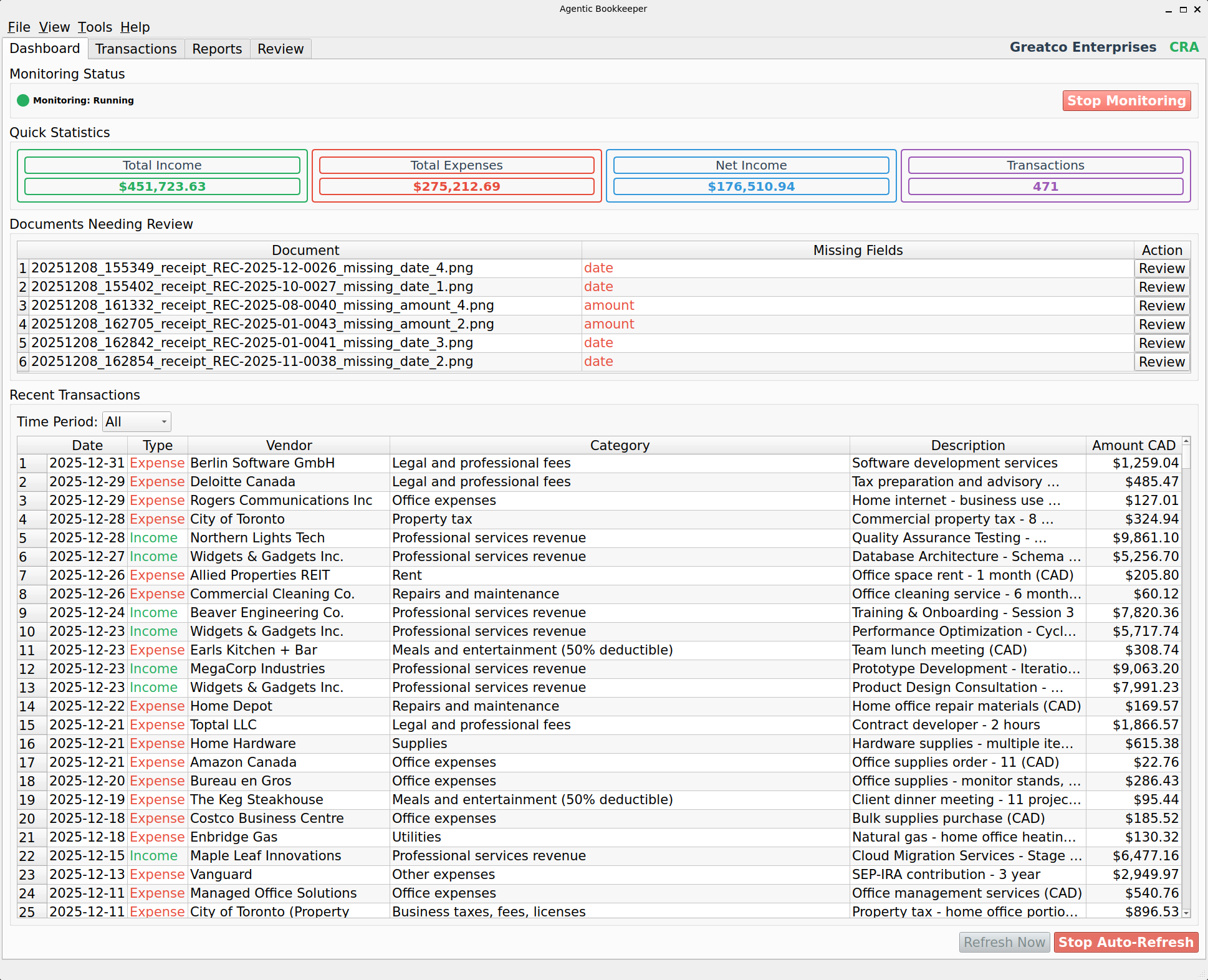
SoloStaff Bookkeeper Dashboard showing real-time statistics, document processing status, and financial overview

Dashboard

Real-time overview with income, expenses, and batch processing with duplicate detection
Click to enlarge
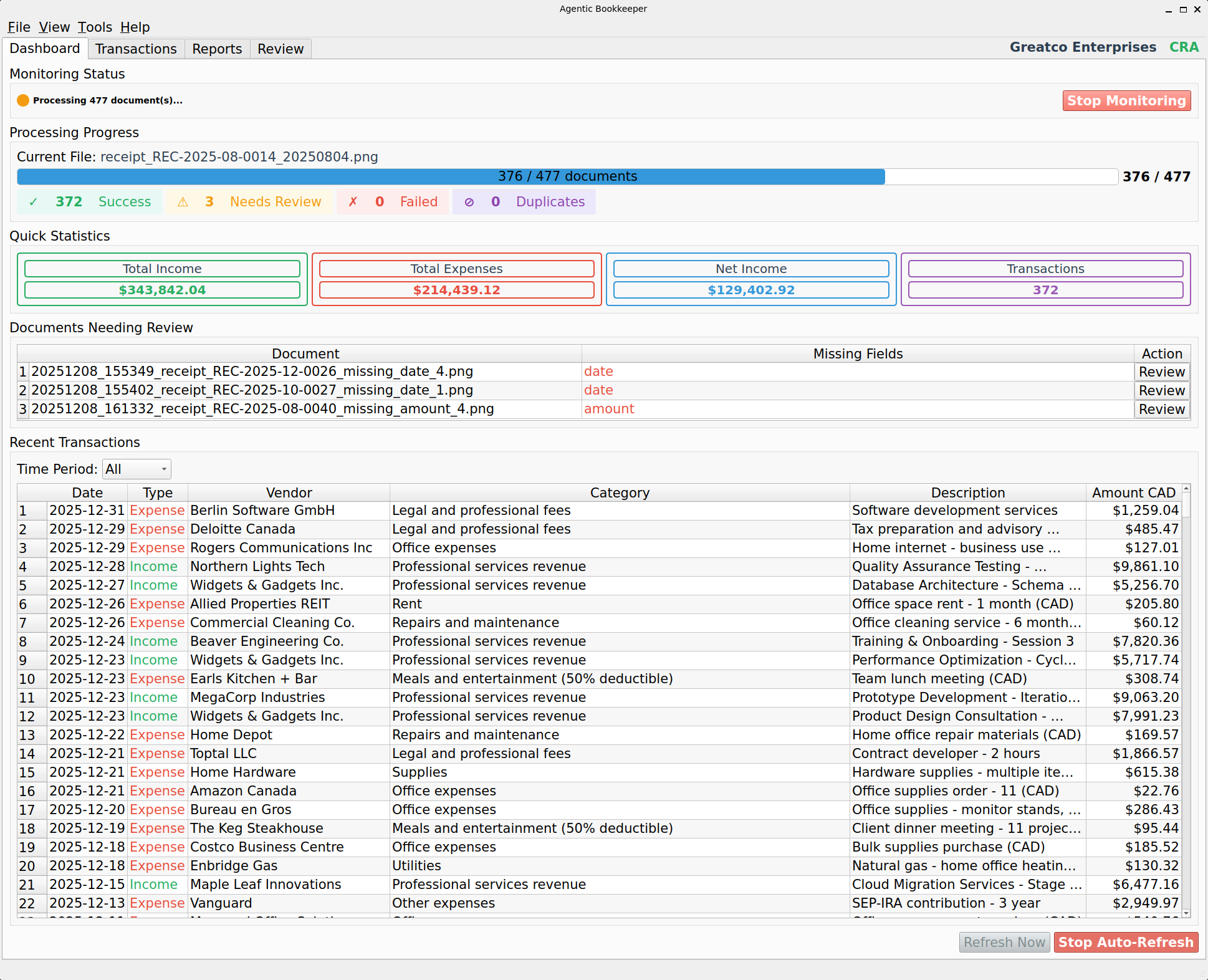
SoloStaff Bookkeeper batch processing 477 documents with progress bar and status counters

Batch Processing

Real-time visual feedback with duplicate detection while processing documents
Click to enlarge
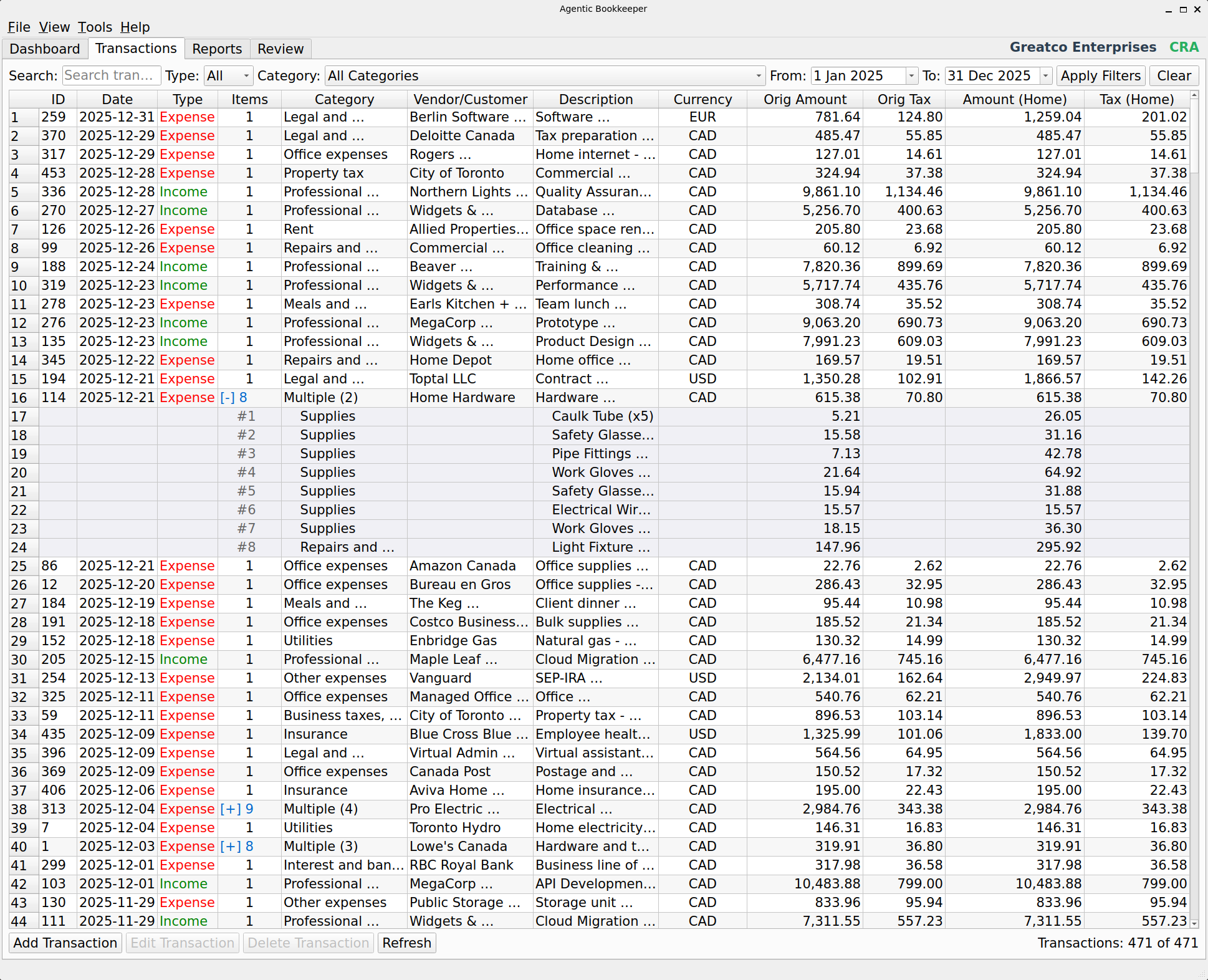
SoloStaff Bookkeeper Transactions view with expanded multi-item receipt showing individual line items

Multi-Item Transactions

Expandable rows show individual line items from multi-item receipts
Click to enlarge
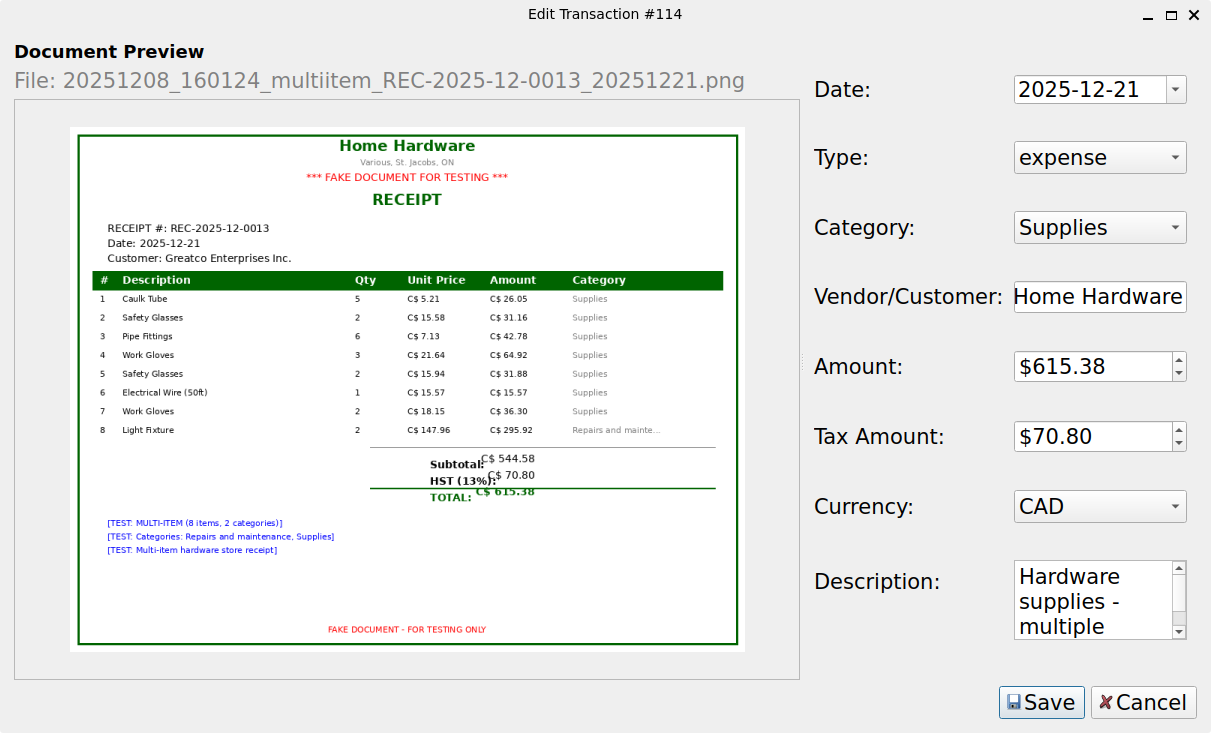
SoloStaff Bookkeeper Transaction Edit dialog with document preview showing multi-item receipt

Document Review

Review AI-extracted data with document preview and category selection
Click to enlarge
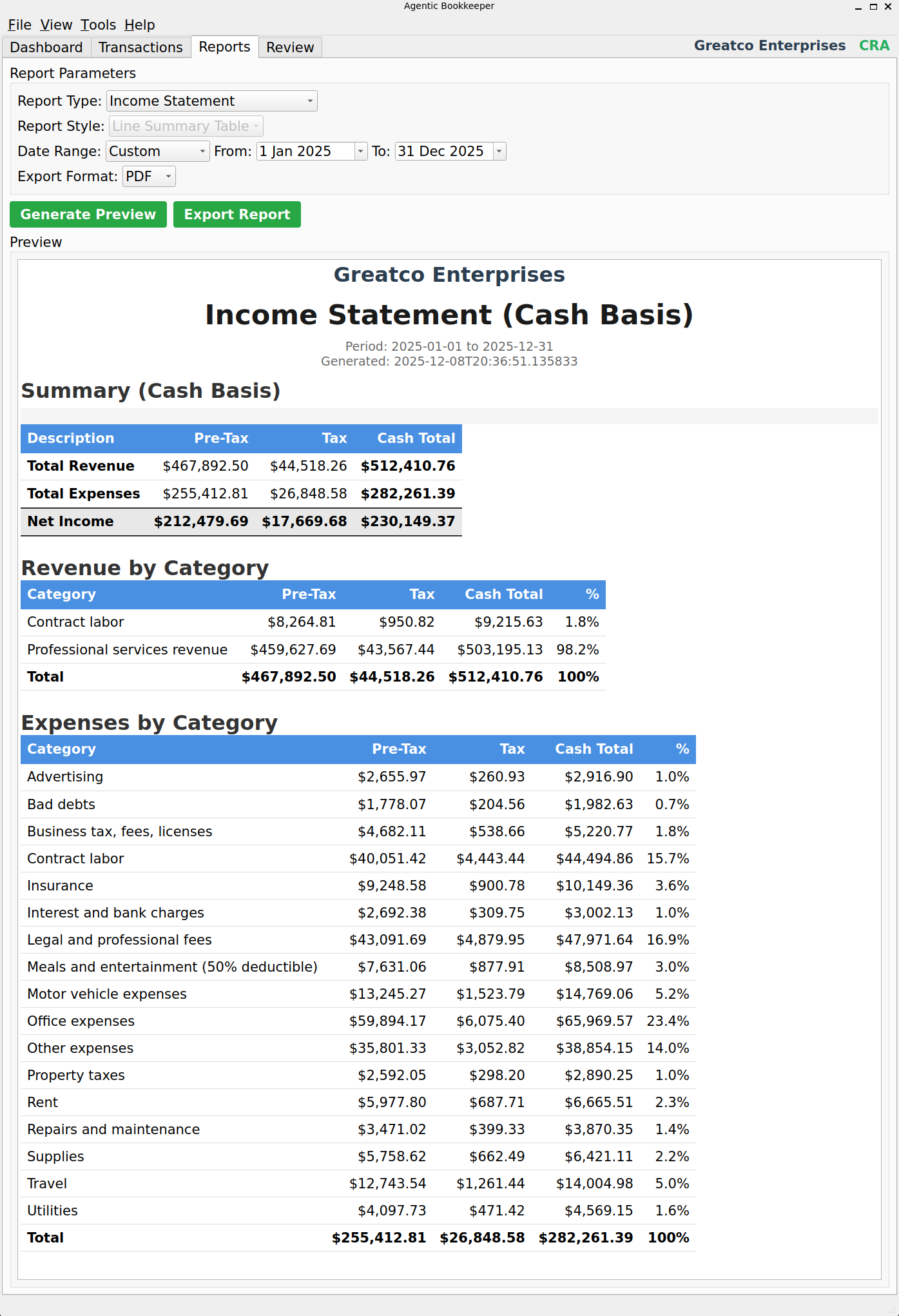
SoloStaff Bookkeeper Income Statement report showing revenue and expenses by category

Income Statement

Cash basis income statement with pre-tax, tax, and cash totals by category
Click to enlarge
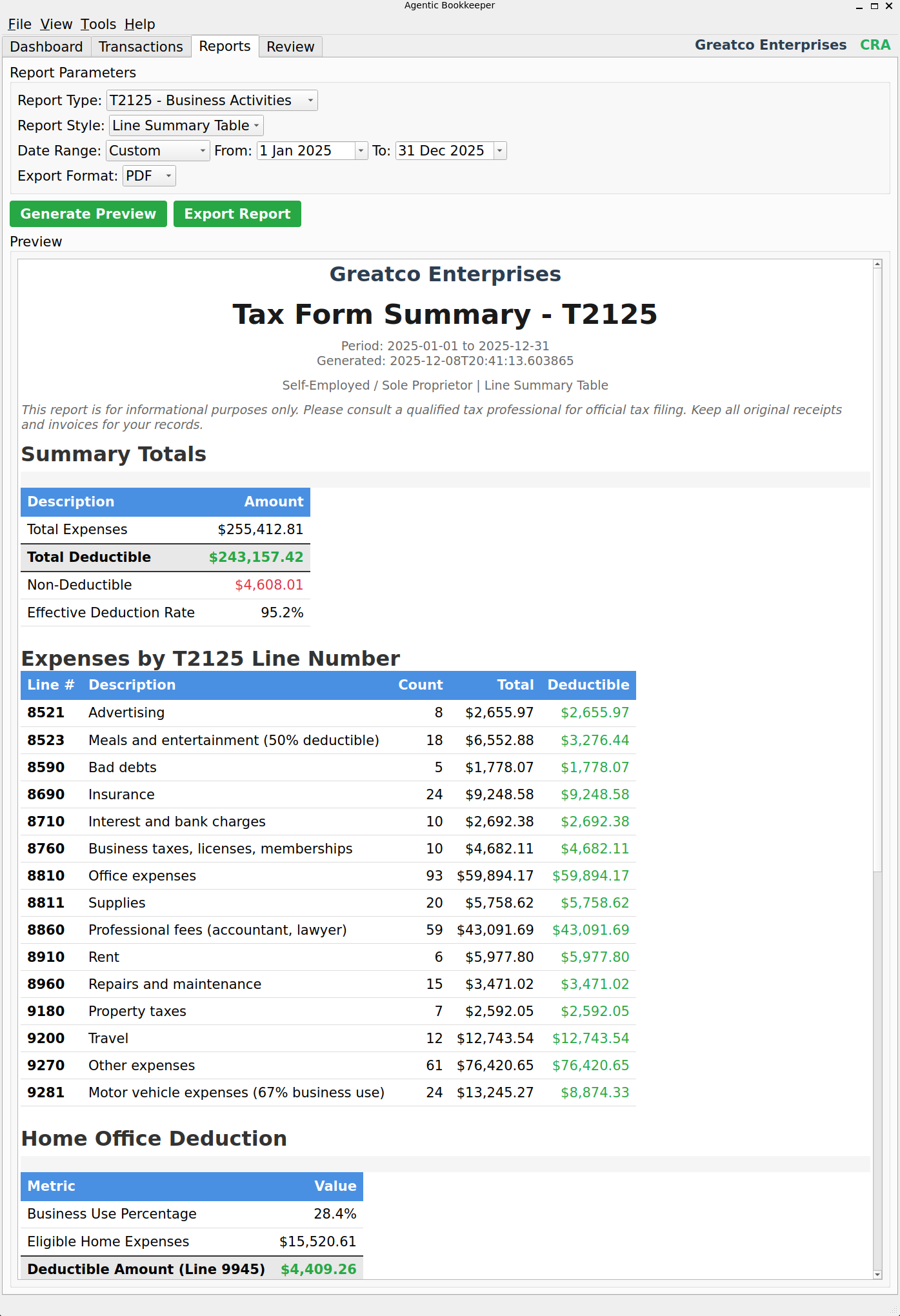
SoloStaff Bookkeeper T2125 Tax Form Report with expenses mapped to official CRA line numbers

Tax Form Report

Expenses mapped directly to CRA T2125 (or IRS Schedule C) line numbers
Click to enlarge
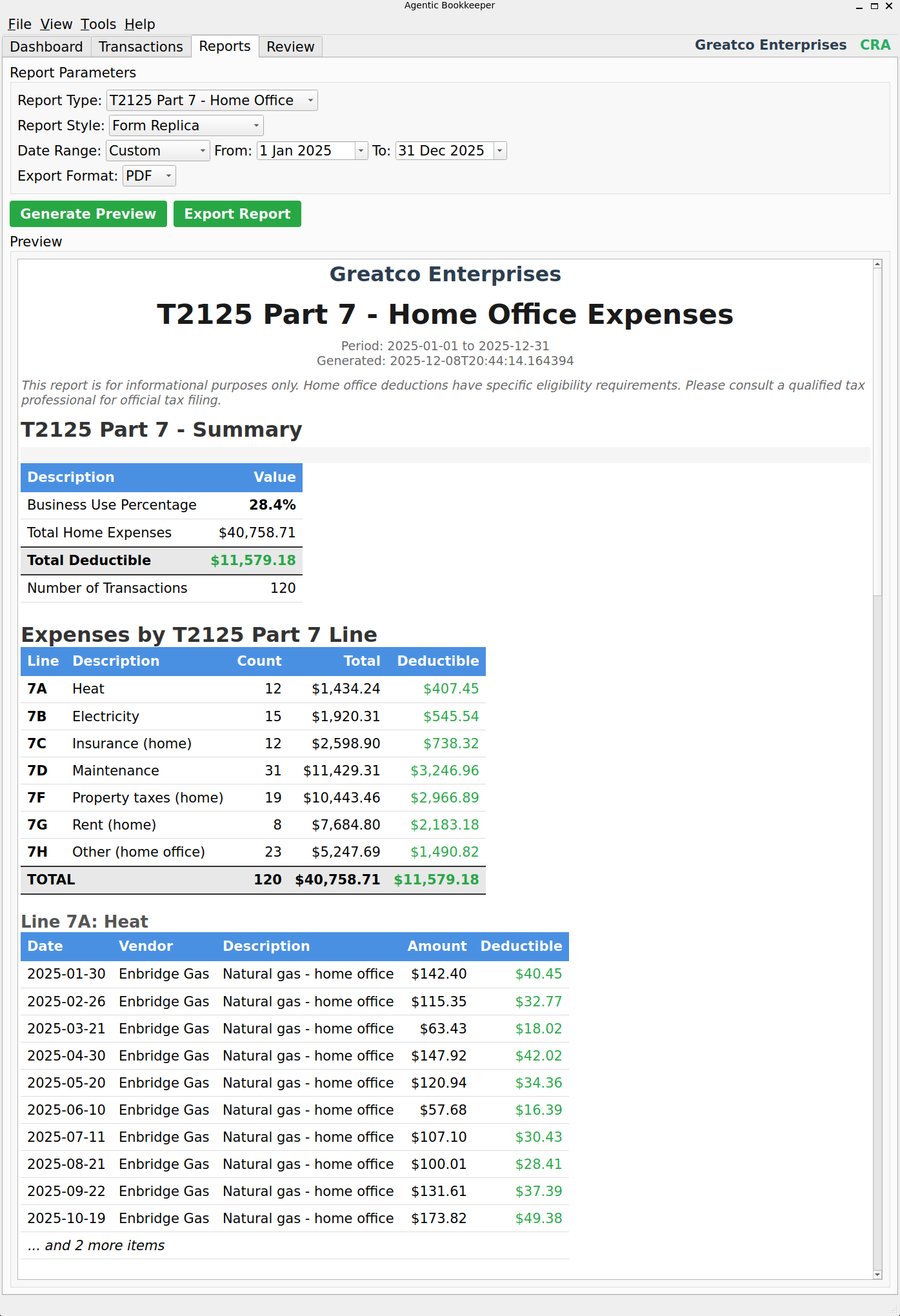
SoloStaff Bookkeeper Home Office Report with T2125 Part 7 business use percentage calculations

Home Office Report

Track home office expenses with business use percentage for CRA T2125 Part 7
Click to enlarge
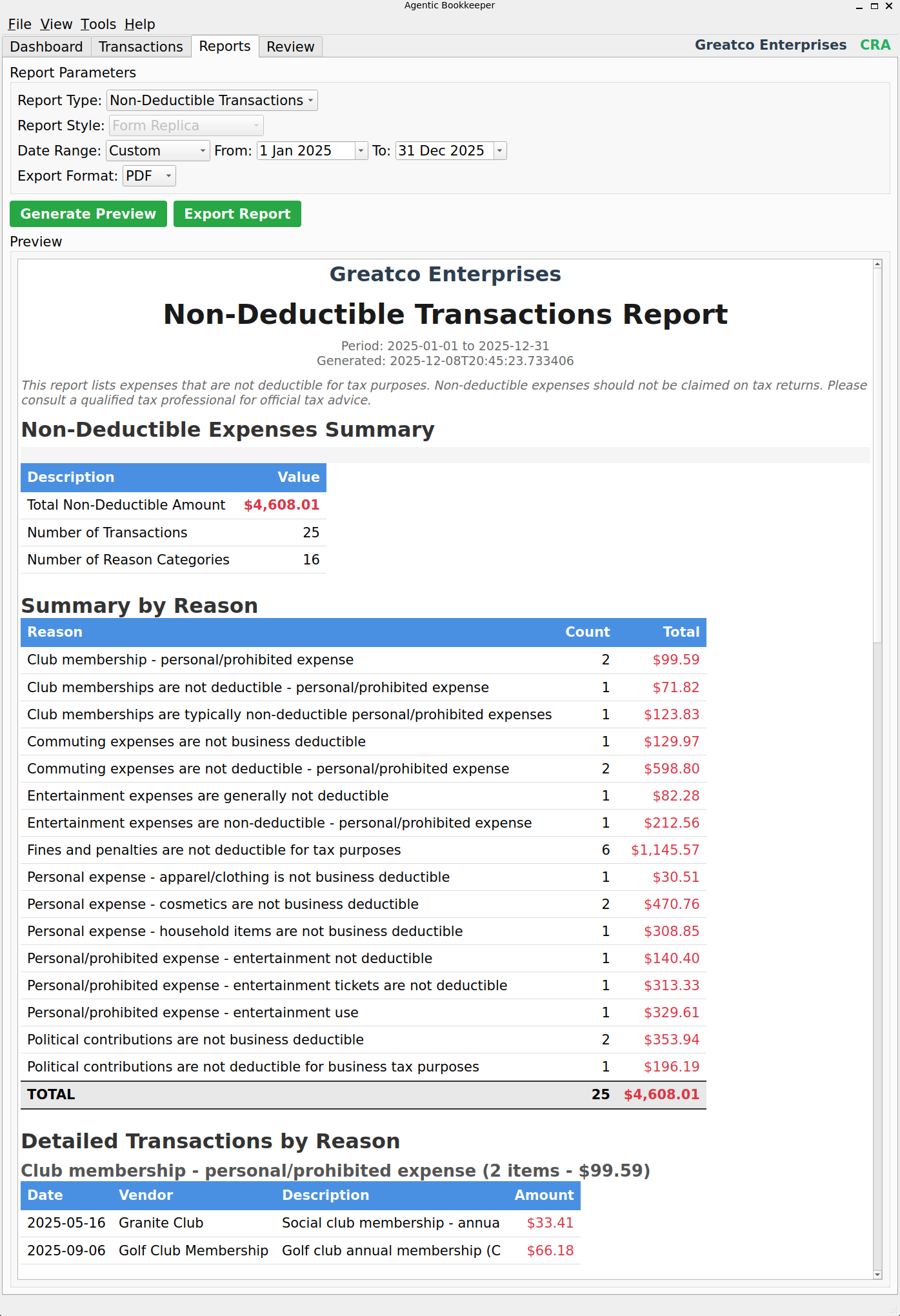
SoloStaff Bookkeeper Non-Deductible Transactions report showing expenses that cannot be claimed

Non-Deductible Report

Track personal expenses and non-deductible items with audit trail

Click to enlarge

Features That Matter

Focused on what freelancers and small businesses actually need

Automatic Document Processing

Drop a receipt in the folder and walk away. AI vision reads the document, extracts line items, and creates categorized transactions - no manual entry required.

Multi-Item Receipt Support

Hardware store receipts with 8 items? No problem. Each line item is extracted with its own category, so your tax reports are accurate down to the item level.

Tax Form Line Mapping

Reports map directly to IRS Schedule C and CRA T2125 line numbers. Hand your accountant reports organized exactly how tax forms require.

GST/HST & Sales Tax Tracking

Automatically tracks tax collected on income and tax paid on expenses. See your input tax credits and net tax position at a glance.

One-Click Reports

Generate Income Statement, Expense Report, or Tax Summary for any date range. Export to PDF for your accountant or CSV for further analysis.

Multi-Provider AI

Choose from OpenAI, Anthropic, Google, or xAI. Use the provider that fits your budget and preferences - switch anytime.

Your Data Stays Yours

Everything runs on your computer. Financial data never leaves your machine. No cloud accounts, no data sharing, no privacy concerns.

Multi-Currency Support

9 currencies supported with automatic detection and exchange rate conversion. Hybrid online/offline rates ensure conversions work even without internet.

Duplicate Detection

Automatically detects and prevents duplicate invoices and receipts. Never accidentally record the same transaction twice.

Home Office Tracking

Track home office expenses with business use percentage calculations. Reports align with CRA T2125 Part 7 and IRS Form 8829 requirements.

Thoroughly Tested

647 passing tests, 92% code coverage, comprehensive security review. Built to professional engineering standards.

What SoloStaff Bookkeeper Doesn't Do

Transparency about scope - so you know if it's right for you

Not Designed For

  • Inventory management or manufacturing
  • Payroll processing or employee management
  • Multi-entity consolidation
  • Accrual-basis accounting (cash-basis only)
  • Purchase orders or complex supply chains
  • Automatic bank synchronization
  • Invoice creation (tracking only)

Designed For

  • Tracking income and expenses for taxes
  • Processing receipts and invoices automatically with duplicate detection
  • Multi-item receipts with per-item categorization
  • Tax form reports mapped to IRS Schedule C and CRA T2125 line numbers
  • Home office expense tracking with business use percentage
  • GST/HST and sales tax tracking with net position
  • Multi-currency transactions with automatic exchange rate conversion
  • Cash-basis record keeping
  • People who want organized records without complexity

Bottom line: If you need to track expenses for your tax return and want to stop manually entering receipts, this is for you. If you need full-service accounting software with payroll and inventory, look elsewhere.

How It Compares

The right tool depends on your needs

Feature QuickBooks Online
($30-70/month)
Excel Spreadsheets
(Free)
SoloStaff Bookkeeper
(One-time purchase)
Automatic Receipt Processing Extra cost add-on Manual entry AI-powered, included
Tax Category Mapping Yes Manual setup IRS & CRA built-in
Learning Curve Steep (2-4 hours setup) Medium 10 minutes
Monthly Cost $360-840/year Free $2-5/month AI costs only
Data Privacy Cloud servers Local files Local + encrypted
Time Per Receipt 30-60 seconds 2-3 minutes 0 seconds (automatic)
Inventory Management Full featured Basic Not included
Payroll Full featured No Not included

Built for Reliability

Production-grade engineering with comprehensive testing

Technology Stack

  • Application: Python 3.8+ with PySide6 GUI
  • Database: SQLite (local, bank-grade reliable)
  • Document Processing: PyMuPDF, Tesseract OCR
  • AI Providers: OpenAI, Anthropic, Google, xAI
  • Reports: ReportLab PDF generation
  • Security: AES-256 encryption for API keys

Quality Metrics

  • Test Suite: 647 passing tests
  • Code Coverage: 92%
  • Security Review: Passed (no critical issues)
  • Performance: <10s per document
  • Memory: <200MB footprint
  • Database Queries: <50ms response

System Requirements

  • OS: Windows 10+, Linux, macOS
  • RAM: 4GB minimum, 8GB recommended
  • Storage: 500MB + space for documents
  • Internet: Required for AI API calls
  • AI Account: Any supported provider
  • Typical AI Cost: $2-5/month

Beta Pricing

One-time purchase. No subscriptions. No hidden fees.

SoloStaff Bookkeeper

$149 $50 USD

Beta Price (One-time purchase)

  • Full desktop application (Windows, Linux, macOS)
  • Unlimited document processing with duplicate detection
  • Tax Form Reports mapped to IRS Schedule C and CRA T2125 lines
  • Multi-currency support (USD, CAD, EUR, GBP, AUD, CHF, JPY, MXN, CNY)
  • Home office expense tracking with business use percentage
  • All AI provider integrations (OpenAI, Anthropic, Google, xAI)
  • Free updates in v1.x series
  • Email support included

Ongoing Costs

AI API usage only: typically $2-5/month for 50-150 receipts

You pay the AI provider directly. We don't mark up or resell API access.

Get Started Today

Return on Investment

Manual bookkeeping time saved 10 hrs/month
At $30/hour value $300/month
Pays for itself in 2 weeks
First-year total value $3,600+

Plus potential tax savings from better deduction tracking

Beta Program - Release Candidate

Get a fully functional product today at a significant discount

v0.9.1-beta Release Candidate

What is Beta (Release Candidate)?

This is a Release Candidate - a fully functional product that has been extensively tested and is approaching version 1.0. The core features are complete and thoroughly tested (647 tests, 92% code coverage). In exchange for being an early adopter, you get a significant discount off the eventual release price.

Why the Discount?

Beta customers help validate the product in real-world use. Your feedback shapes priorities for the final release, and you may encounter occasional rough edges as final polish is applied. The discount reflects this partnership - you get a great price, and we get valuable input to make the product better for everyone.

What's Fully Functional Now

  • Full desktop application for Windows, macOS, and Linux
  • Multi-item receipt support - each line item categorized individually
  • Automatic duplicate invoice and receipt detection
  • Multi-currency support with automatic exchange rate conversion
  • Tax Form Reports mapped to IRS Schedule C and CRA T2125 line numbers
  • Meals and entertainment 50% deduction calculated automatically
  • Home office expense tracking with business use percentage
  • Non-deductible expense identification and reporting
  • Complete GST/HST and sales tax tracking
  • Company branding on PDF reports

Planned for Future Updates

  • Bank statement import and reconciliation
  • Multi-year comparison reports
  • Budget tracking and alerts
  • Export to QuickBooks/Xero formats

Beta Benefits

  • 66% discount: $50 USD now vs. $149 at full release
  • Lifetime v1.x updates: All improvements included at no extra cost
  • Priority support: Direct email support with faster response times
  • Influence development: Your feedback helps prioritize final features

Get Beta Access

Ready to simplify your bookkeeping? Get Beta pricing at $50 USD.

Contact Information

If you're a freelancer or small business owner tired of manual receipt entry, SoloStaff Bookkeeper is available now at Beta pricing. Get duplicate detection, multi-currency support, tax form reports, and an intuitive interface - all for $50 USD (regular price $149).

Availability

Beta (Release Candidate) - available now with special pricing