Subscription fatigue is not a marketing term — it is a measurable operational cost. Research from Zylo's 2025 SaaS Management Report found that the average company wastes $135,000 per year on unused or underused SaaS licenses. [3] For a large enterprise that number might be rounding error. For a solo professional or a small team, it represents a significant fraction of operating budget directed at tools that sit idle most of the time.
Beyond raw cost, there is the cognitive overhead: tracking renewal dates, auditing which integrations still function after an API change, re-authenticating every few months because a provider rotated OAuth tokens. Customers experience this as overwhelm — a sense that the tooling has become more work than the work itself. [1] A local-first tool eliminates the renewal cycle entirely: you buy it once, it runs on your machine, and it keeps running whether or not I am still in business.
Data Should Outlive Its Vendor
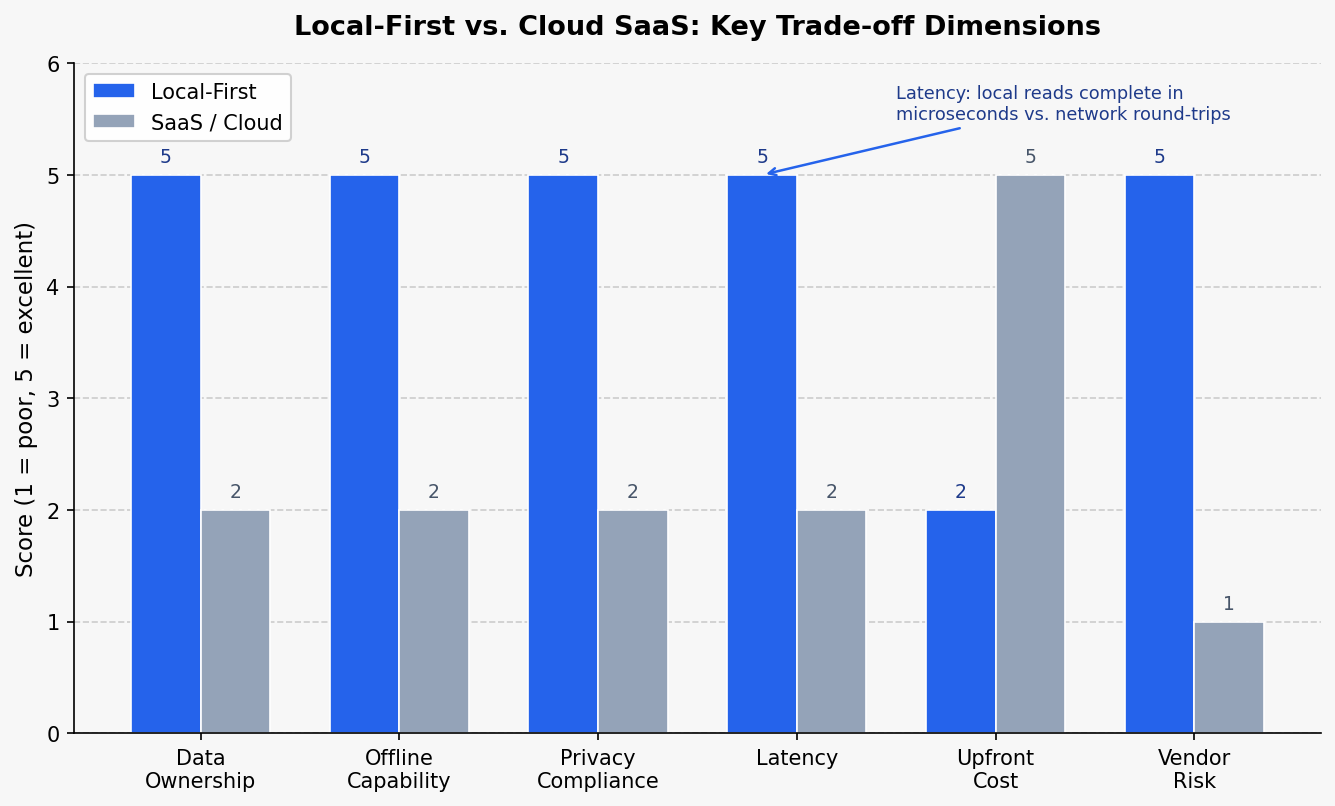
The harder argument for local-first is not cost — it is ownership. In a traditional SaaS model, if the provider goes bankrupt, changes its terms of service, or simply discontinues a product, your data may be held hostage or simply disappear. [4] With local-first software, the user's data exists on their own machine in a format they control. Even if I stop developing SoloStaff Bookkeeper tomorrow, every transaction record a user has entered remains accessible and portable.
This matters differently for different types of users. A freelancer tracking invoices needs those records available long after a transaction closes. A consultant using a meeting secretary tool may need to reference notes from client engagements years into the future. Tying that continuity to a vendor's subscription revenue creates a fragile dependency that local-first eliminates. [4]
What Local-First Looks Like in Practice
Describing local-first as a philosophy is straightforward. Implementing it consistently across a suite of tools requires deliberate engineering decisions at every layer. In my consulting technology stack — which I use to run my own marketing operations — every persistent data store is a local SQLite database. [5]
The marketing assistant system uses discrete SQLite-backed stores for each domain concern.
Budget tracking writes cost events to a local database through a
BudgetManager component.
[6]
Trust governance decisions are persisted through a separate TrustManager
backed by its own SQLite instance.
[7]
The content calendar, engagement metrics, performance scores, and oversight events each
have dedicated local stores rather than routing through a centralized cloud API.
[8]
Schema evolution is handled by a DatabaseMigrator class that manages
versioned migrations applied locally on each machine.
[9]
When I need to pull in data from an external service — such as syncing subscriber
contacts from SendGrid — the data is fetched once and written into a local database,
so subsequent reads never touch the network.
[10]
The principle is consistent: cloud services are treated as data sources,
not as the system of record.
For the SoloStaff retail products, the same philosophy applies at a simpler scale. SoloStaff Bookkeeper stores all transaction data on the user's machine. [2] SoloStaff Invoice generates and stores invoices locally, with no account required and no data transmitted to my servers. [2] [2] The desktop deployment model is a feature, not a limitation.
Privacy Becomes Structural, Not Procedural
One underappreciated benefit of local-first architecture is how it simplifies privacy compliance. When sensitive data never leaves the user's machine, the attack surface for a data breach is narrowed to the device itself. [4] There is no central database for an attacker to target, and no third-party sub-processor to audit. [4]
Local-first architecture also reduces the compliance surface for regulations such as GDPR and CCPA. When personal data is not stored on a central server, the scope of required audits shrinks significantly. [4] For a solo operator without a dedicated compliance team, this is a meaningful operational advantage. Privacy becomes a structural property of the architecture rather than a procedural checklist to maintain.
Performance is a secondary benefit here. Local reads and writes have no network latency — operations that would require an API round-trip in a cloud-hosted system complete in microseconds. [11] For a bookkeeping tool or an invoice generator that runs dozens of queries per session, this difference is perceptible in day-to-day use.

The Trade-offs Are Real and Worth Naming
Local-first is not a silver bullet. The same properties that make it resilient for single-user tools introduce genuine engineering complexity at larger scales. Distributed-data challenges — conflict resolution when data is modified on multiple devices, schema migrations that must run correctly on every client machine — are real problems that cloud-hosted systems centralize away. [12]
For the SoloStaff product line, this trade-off is acceptable because the use case is explicitly single-user. A freelancer tracking their own invoices does not need multi-device conflict resolution. For multi-user collaboration tools, a pure local-first architecture would require a synchronization layer — at which point the distinction between local-first and cloud-hosted begins to blur at the edges.
Backups are the user's responsibility in a local-first model. [13] I document this clearly in every product: the data lives on your machine, which means backing it up is your job. Most users consider this a reasonable trade for the ownership guarantees it provides. Some do not — and for those users, a cloud-hosted alternative is probably the right choice.
Where This Leaves the SoloStaff Philosophy
The local-first decision for SoloStaff was not primarily a technical position. It was a values position about what kind of tool is worth building for solo professionals. A tool that works when the internet is down. A tool that does not charge a monthly fee to access records you created. A tool whose data format you own and can move elsewhere if you choose to. [2]
The engineering follows from those commitments. SQLite as the persistence layer. [5] Desktop deployment as the distribution model. No account required, no data transmitted without the user's explicit action. These are not compromises made for simplicity — they are the implementation of a deliberate architectural philosophy.
As subscription fatigue continues to drive businesses to question the value of multiple simultaneous SaaS commitments, there is a growing space for tools that take the opposite position: owned, local, and durable. [1] That is the space SoloStaff occupies, and it is where I intend to keep building.
Sources
- web: web-src-5 — verified
- marketing-agent-definition.md: documentation file (reliability: 0.8)
- web: web-src-4 — verified
- web: web-src-3 — verified
src/marketing_agent/config.py: DatabaseConfig class (reliability: 0.9)tests/conftest.py: budget_manager function (reliability: 0.9)tests/conftest.py: trust_manager function (reliability: 0.9)tests/conftest.py: state_manager function (reliability: 0.9)tests/test_005_persistence.py: TestDatabaseMigrator class (reliability: 0.9)tests/test_005_persistence.py: test_creates_database_on_first_run function (reliability: 0.9)- web: web-src-1 — verified
- web: web-src-6 — verified
- README.md: project README (reliability: 0.8)