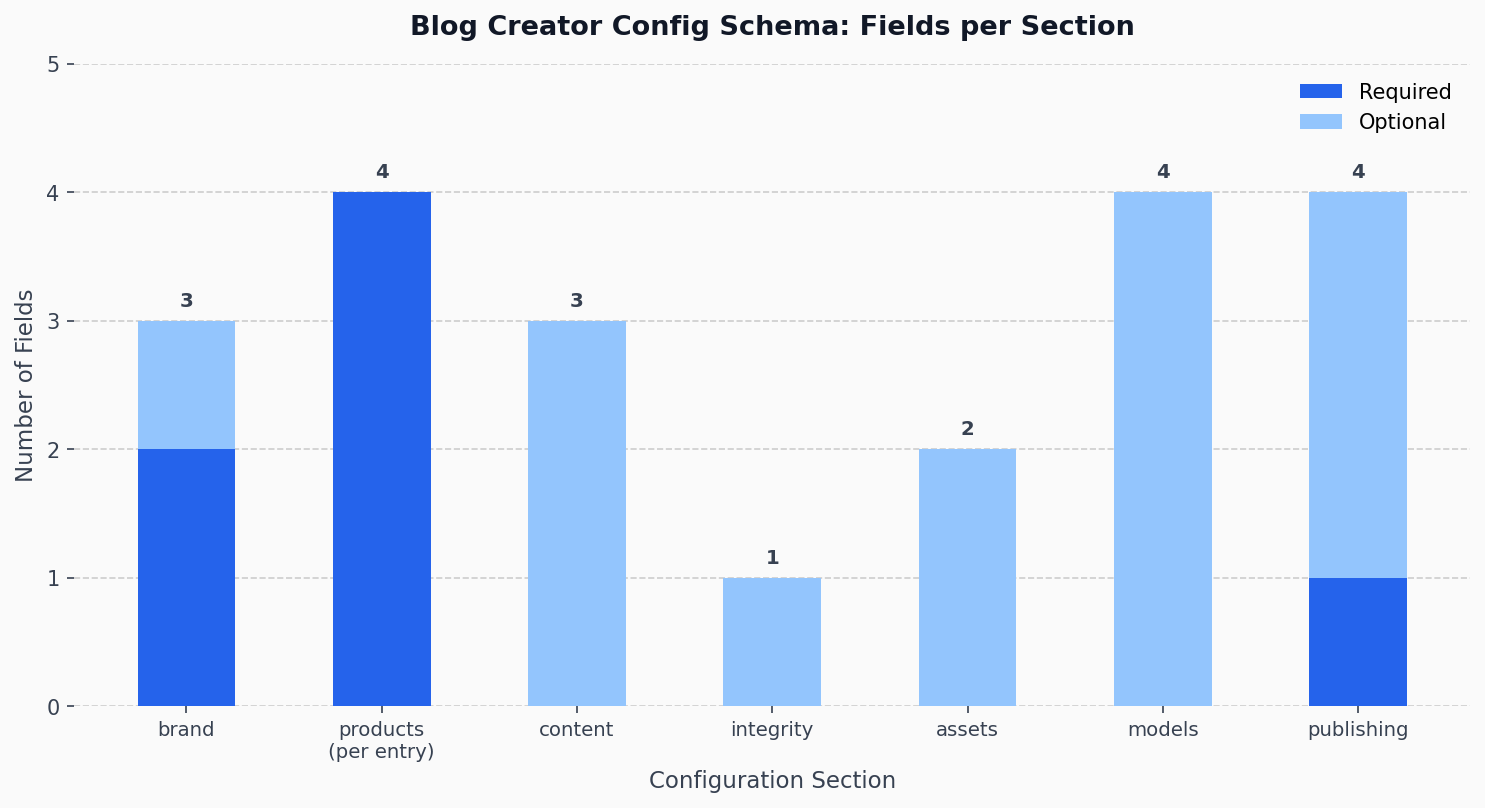
The blog-creator.yaml configuration schema covers seven top-level sections.[2] Each section addresses a distinct concern in the pipeline. Together they form a complete description of who is publishing, what they sell, how they want to sound, and where the output goes.
The design follows the Configuration Externalization pattern, a well-established approach in which operators adjust settings without touching the codebase.[3] In Blog Creator's case, this means a technical founder, a management consultant, and a nonprofit communications officer can all run the same pipeline — differentiated only by their YAML files.[4]
Section 1: Brand Identity
The brand section carries three fields: name, domain, and the optional tagline.[5] Both name and domain are required non-empty strings — the loader raises ConfigValidationError if either is missing.[6] The tagline surfaces naturally in post footers and introductions, giving every generated post a consistent voice rooted in the brand rather than the tool that created it.
In the production config for this site, the brand name is "Stephen Bogner, P.Eng." with domain "stephenbogner.com" and tagline "AI tools you own. Simple. Smart. Solo strong."[7] That single block is the only place in the entire system where that identity is defined.
Section 2: Product Catalog with Source Paths
The products list is where the pipeline learns what to write about and where to find the evidence. Each entry carries four required fields: name, page, source_path, and docs_path.[8]
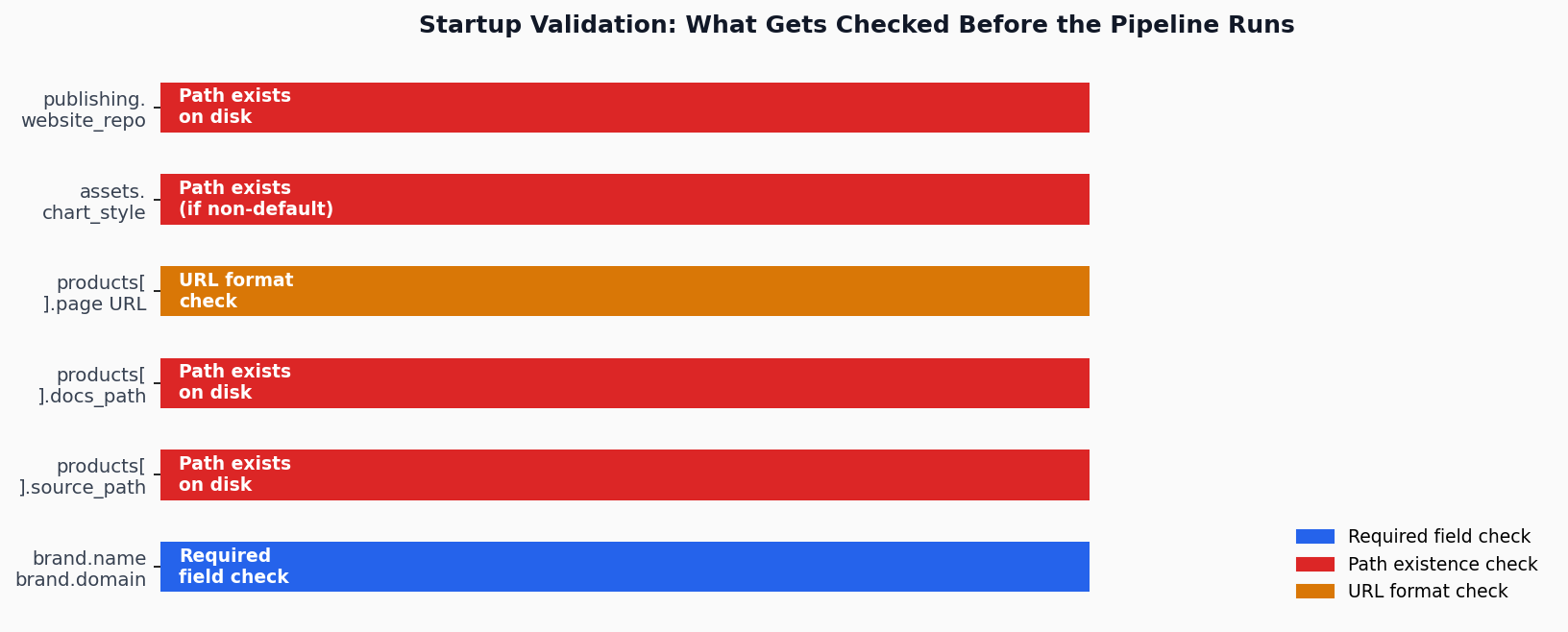
The source_path and docs_path fields are not merely strings — they are checked for existence at startup. If either directory is missing, the loader raises a ConfigValidationError before any pipeline stage runs.[9] This is deliberately fail-fast behavior: it is better to surface a misconfigured path at load time than to discover it mid-pipeline when the research agent tries to read files that don't exist. The test suite verifies this explicitly via test_nonexistent_source_path() and test_nonexistent_docs_path().[10]
The page field must be a valid URL beginning with http:// or https://.[11] This constraint prevents the publisher from silently generating posts that link nowhere.
Section 3: Content Tone and Audience
The content section gives the writing agent its editorial charter. Three fields drive it: tone, audience, and guidelines.[12]
Tone is a comma-separated descriptor string. The default is "professional, honest, engineering-minded", but it's designed to be overridden.[13] The dogfood runs illustrate the range: the technical founder persona uses a technical, code-driven tone targeting software developers, while the consultant persona uses a conversational, approachable voice aimed at operations leaders and executives.[4] These aren't cosmetic differences — the writing agent reads the tone descriptor to shape sentence structure, vocabulary, and how technical it assumes the reader to be.
The guidelines list is a free-form array of editorial rules enforced at generation time. For this site, those include rules like "Write from real engineering experience, not marketing hype" and "Never fabricate anecdotes, customer quotes, testimonials, or case studies."[7] Every guideline in that list is passed to the writing agent as a hard constraint, not a suggestion.
Section 4: Integrity Strictness
The integrity section controls the claim verification gate. Its single field, strictness, accepts one of three values: strict, standard, or relaxed.[14] The loader validates this at startup and raises ConfigValidationError for any other value.[15]
Under strict mode, the integrity agent requires every factual claim to trace to a verified source before the post can be published.[16] Under standard, minor unsourced framing claims are allowed. Under relaxed, the gate still runs but the pass threshold is lower, useful for exploratory or opinion pieces.
This site runs strict by default.[7] The three dogfood runs that validated the pipeline all passed: integrity scores of 0.96, 0.98, and 0.98 across a technical founder persona, a consultant, and a nonprofit communications context.[4] Same integrity code, different thresholds configurable per deployment.
Section 5: Asset Generation Settings
The assets section is small but consequential. It carries two fields: output_dir, the directory where charts and diagrams are written, and chart_style, which points to a chart stylesheet.[17]
The default output directory is blog/assets.[13] The chart_style field defaults to "default", which uses the built-in matplotlib theme. If a non-default value is provided, the loader checks that the path exists at startup — the same fail-fast discipline applied to source paths.[18] This means a misconfigured chart theme fails loudly at config load, not silently at chart generation time during Stage 4.
Section 6: Per-Agent Model Selection
This is the section that distinguishes Blog Creator from pipelines that treat model selection as a global switch. The models section allows each of the four pipeline agents — research, writing, visuals, and integrity — to use a different Claude model.[19]
Valid values are opus, sonnet, and haiku.[20] All four default to sonnet if unspecified.[13] But the real power is the ability to override selectively. This site configures integrity: "opus", routing the most demanding reasoning task — verifying that every claim traces to a source — to the most capable model, while leaving research, writing, and visuals on sonnet for speed and cost.[7]
This pattern mirrors what the broader AI agent ecosystem has converged on: modern orchestration frameworks configure different models per agent role precisely because different tasks have different capability requirements.[21] Per-agent model selection is cost-performance optimization, not over-engineering.
Section 7: Publishing Targets
The publishing section wires the pipeline to a specific website repository. Its required field, website_repo, must point to an existing directory — checked at startup like the product paths.[22] Optional fields control downstream behavior: template_dir names the blog subdirectory within that repo, auto_commit controls whether the publisher commits each new post automatically, and auto_push controls whether it pushes to the remote.[16]
The defaults reflect a sensible starting posture: auto_commit: true but auto_push: false.[13] The post is committed locally but the human decides when to push. For teams or individuals who want fully automated deployment, setting auto_push: true closes the loop without touching a single line of pipeline code.
Validation as Documentation
There is a secondary value to the config validation layer that goes beyond catching mistakes: the error messages are self-documenting. When a field is missing or invalid, ConfigValidationError reports the exact field name and expected format.[23] The test suite covers validation scenarios including missing required sections, invalid URL formats, non-boolean flags, invalid strictness enums, and empty product lists.[5]
A Single Source of Truth only works if the system enforces it.[24] The validation layer at startup is what makes blog-creator.yaml authoritative rather than advisory. If the file is incomplete or inconsistent, the pipeline refuses to run rather than proceeding with unreliable inputs.
The Proof: Three Domains, One Pipeline
The real test of a configuration-driven design is whether it holds across genuinely different domains. The Blog Creator dogfood suite ran the full pipeline against three distinct personas: CodeForge Labs (a technical software product company), Catalyst Consulting Group (a management consulting practice), and Bridges of Hope Foundation (a nonprofit).[4] Each got a different config file. None required code changes.
All three runs passed integrity review. The Separation of Concerns principle holds in practice, not just in theory:[25] the pipeline logic handles how to produce content; the YAML handles what and for whom. Keeping those concerns separate is what makes the tool genuinely portable.
The next post in this series covers the research stage in depth — how the pipeline reads source code, scans documentation, and weaves web findings into a structured research brief before a single word of the post is written.
Sources
- blog-creator-definition.md: documentation file (reliability: 0.8)
scripts/config_loader.py: load_config function (reliability: 0.9)- The Configuration Externalization design pattern enables developers to focus on
- dogfood-results.md: documentation file (reliability: 0.8)
tests/test_config_validation.py: TestBrandValidation class (reliability: 0.9)tests/test_config_validation.py: test_brand_name_required function (reliability: 0.9)blog-creator.yaml: configuration file (reliability: 0.9)tests/test_config_validation.py: TestProductsValidation class (reliability: 0.9)tests/test_config_loader.py: test_nonexistent_source_path function (reliability: 0.9)tests/test_config_loader.py: test_nonexistent_docs_path function (reliability: 0.9)tests/test_config_validation.py: test_product_page_invalid_url function (reliability: 0.9)tests/test_config_validation.py: TestContentValidation class (reliability: 0.9)scripts/config_loader.py: merge_defaults function (reliability: 0.9)tests/test_config_validation.py: test_valid_strictness_values function (reliability: 0.9)tests/test_config_validation.py: test_invalid_strictness_raises_error function (reliability: 0.9)scripts/config_loader.py: validate_config function (reliability: 0.9)tests/test_config_validation.py: TestAssetsValidation class (reliability: 0.9)tests/test_config_validation.py: test_chart_style_nonexistent_path_raises_error function (reliability: 0.9)tests/test_config_validation.py: TestModelsValidation class (reliability: 0.9)tests/test_config_validation.py: test_valid_model_names_accepted function (reliability: 0.9)- Modern AI agent pipelines such as CrewAI configure different models per agent ro (reliability: 0.6)
tests/test_config_loader.py: test_nonexistent_website_repo function (reliability: 0.9)scripts/config_loader.py: ConfigValidationError class (reliability: 0.9)- A Single Source of Truth (SSoT) is a data architecture principle where one autho (reliability: 0.6)
- Separation of Concerns (SoC) is a design principle for separating a software pro (reliability: 0.6)